If you’re building a new website for your clinic, or wondering whether to rebuild the one you’ve already got, you’ll hit this question fast: WordPress or Squarespace?
Both look professional. Both are used by thousands of businesses. And most of the advice you’ll find online won’t help much, because it’s written for e-commerce shops and freelance portfolios, not health clinics.
I build on both platforms, so here’s the comparison I’d actually give a clinic owner sitting across the table from me.
What both platforms do well
Let’s start fair, because both platforms deserve it.
Squarespace is genuinely easy to use. The templates are beautiful straight out of the box, hosting and domains are bundled in, and you can have a professional-looking site live within days. For a clinic that wants to look good online without hiring a developer, it’s a legitimate choice, not a compromise.
Pass and Play was a Squarespace rebuild, while Mike Gratton Coaching was a Squarespace redesign – both sites delivered well on their objectives.
WordPress is the most flexible platform on the web. It powers a huge share of the internet, has an enormous ecosystem of plugins, and gives you serious control over SEO. It can grow with a business for years without needing a rebuild.
Optimum Health and Waverley Foot Clinic were both built in WordPress, and it was the right choice for those businesses.
“Neither is a bad choice. They’re just built for different things, and for a health clinic, with specific needs around bookings, local search and long-term growth, those differences start to matter.”
Stu Taylor – Solaris Digital Farnham
Where they differ for health clinics specifically
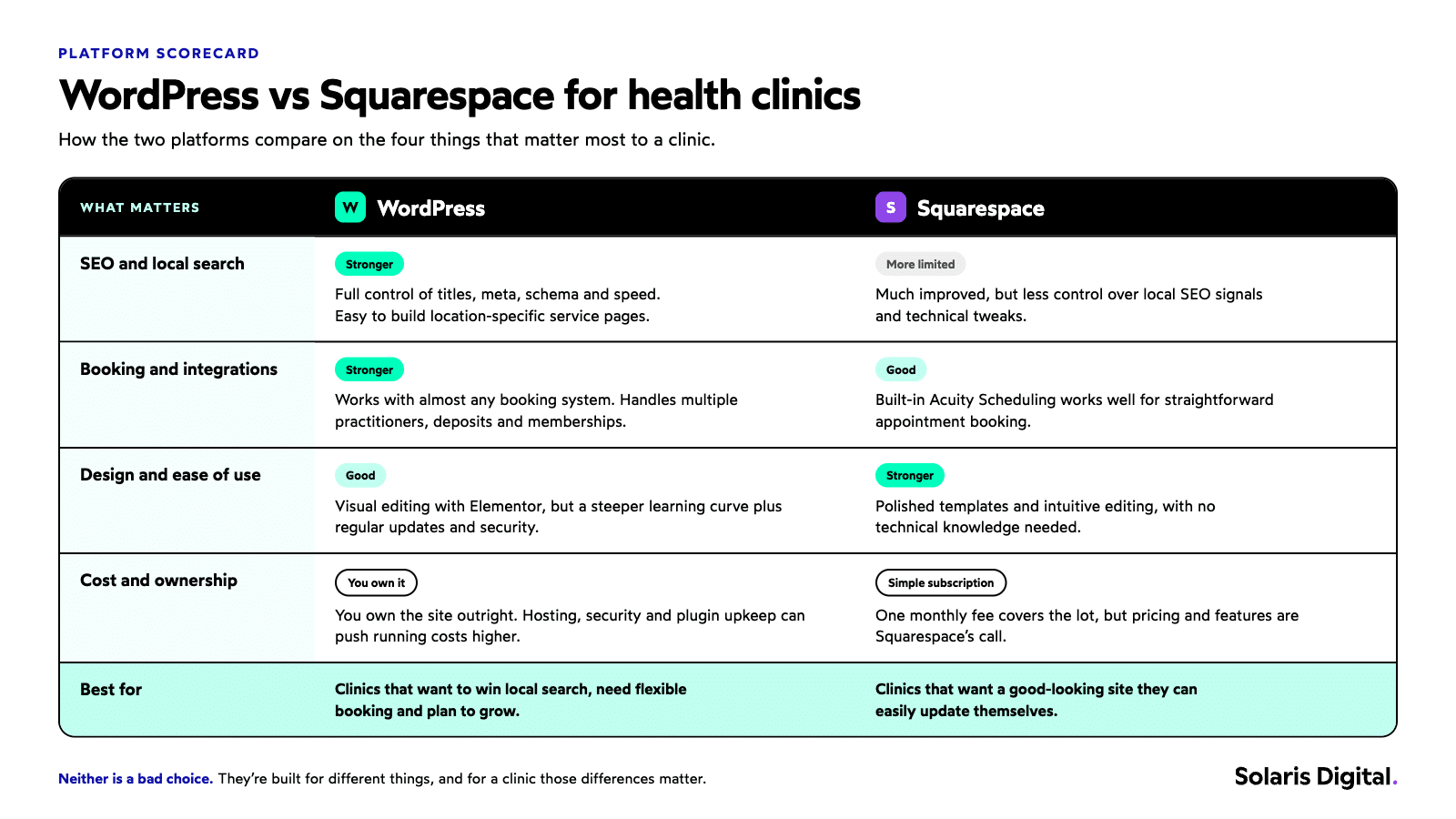
These are the four key areas that matter most to clinic owners.
1/ SEO and local search visibility
WordPress, paired with a plugin like Yoast or Rank Math, gives you granular control over every element that affects search rankings: page titles, meta descriptions, schema markup, site speed, and image optimisation. For a clinic trying to rank for “physiotherapist in Guildford” or get into the local pack, that level of control matters.
Squarespace has improved a lot here, but it’s more limited, particularly around local SEO signals and technical optimisation. The SEO ceiling is where I most often see Squarespace frustrate clinic owners. It’s harder to build location-specific service pages, meta optimisation is more restricted, and the site speed controls aren’t as accessible.
2/ Booking and integration flexibility
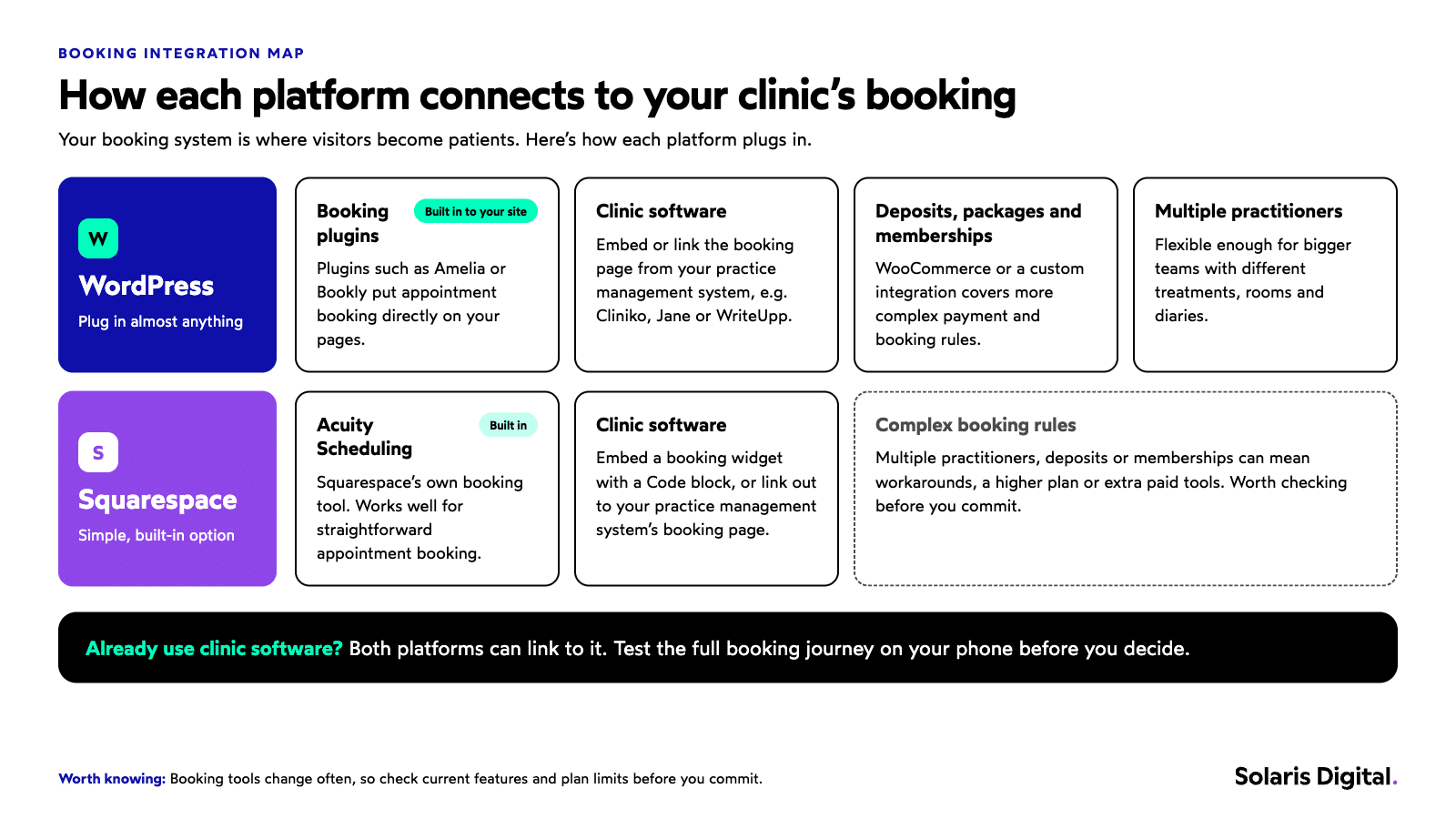
WordPress supports pretty much any third-party booking system, through plugins or custom integration. It enables you to adapt for more complex booking needs like multiple practitioners, different service types, deposits, and membership management. Squarespace has its own booking tool (Acuity, now Squarespace Scheduling), which works well for straightforward appointment booking.
3/ Design and ease of use
This is where Squarespace genuinely leads. The templates are polished and consistent, and making changes is intuitive without any technical knowledge. WordPress with Elementor (my layout builder of choice) is also visual and accessible, but it has a steeper initial learning curve and needs more ongoing attention on updates and security.
4/ Cost and ownership
Squarespace is a subscription: you pay monthly, and the platform owns the infrastructure and handles everything inside the subscription. If Squarespace changes its pricing or drops a feature, you’re subject to that decision. WordPress is self-hosted and, for a long-term business asset, that ownership can matter. You own the site outright; however, the running cost can be higher once you factor in hosting, security monitoring and plugin maintenance.
The migration question: should you switch?
Here’s the honest answer first: switching platforms has a real cost.
It takes time, it’s disruptive, and your search rankings usually dip temporarily while the new site settles into Google’s index. It’s not a decision to be taken lightly.
When switching is worth it
- Your current site can’t be found on Google, and the platform’s SEO limitations are the reason
- You’ve outgrown your booking system, and it’s costing you appointments
- You need integrations the platform doesn’t support
- Your site looks dated, and a rebuild is needed anyway
When staying put makes more sense
- Your Squarespace site is performing well and bookings are coming in
- It works well functionally for all your needs
- You’re at an early stage and getting something live matters
If a Squarespace site is generating consistent bookings and the clinic is ranking reasonably well locally, the case for switching needs to be specific. The disruption and the temporary ranking dip have to be worth it.
Platform switching is a means to an end, not an end in itself. If your current platform is limiting growth in ways you can point to and measure, the switch pays for itself. If it’s more of a vague feeling that WordPress is better, it probably isn’t worth the upheaval.
“I’ve migrated clinics from Squarespace to WordPress when the case was clear. And I’ve recommended staying put when it wasn’t.”
Stu Taylor – Solaris Digital Farnham
Which platform is right for your clinic?
Here’s where I’d actually draw the line, rather than leaving you scratching your head and saying, “it depends”!
Choose Squarespace if:
- You’re a sole practitioner or a small clinic at an early stage
- You want to manage updates yourself, confidently, without technical help
- Your booking needs are straightforward: one practitioner, one service type
- Budget is genuinely tight, and you need something live quickly
- Design is a high priority, and you want strong results with minimal effort
Choose WordPress if:
- You want strong local SEO performance and to compete seriously in your area
- Your clinic has multiple practitioners, complex booking requirements, or plans to grow
- You want full ownership and control of your website as a long-term asset
- You need the flexibility to integrate other systems as the business develops
- You want someone actively managing, improving and reporting on performance over time
The inflexion point for most clinics is when they start taking local SEO seriously. That’s when the gap between the platforms becomes real: WordPress gives you the tools to compete for “physio in Guildford” or “podiatrist Farnham”.
If you want a simpler way to decide, I’d ask three questions:
- Do I want to rank locally for competitive terms?
- Do I need complex booking functionality?
- Do I want someone actively managing and improving my site over time?
If the answer to two or three of those is yes, WordPress is almost always the right call.
Final thought: focus on the end goal
Wherever your clinic is right now, the platform is the foundation, not the outcome. What matters is a site built with a clear purpose: generating bookings, being found in local search, and building trust with patients before they’ve even walked through the door.
I build on WordPress and Squarespace, and I always recommend the one that’s right for your clinic, not the one that’s easiest for me. If you’d like an honest recommendation for your clinic, I offer a free consultation for health and wellbeing businesses across Surrey and Hampshire.
Related reads: Why your Surrey health clinic’s website is losing bookings and Can AI build my health clinic’s website?